

The Connected Construction Site: A Practical Guide to Wireless Connectivity
The construction industry is not known for moving quickly when it comes to information technology. As the second-least digitized industry in the U.S, adoption has been slow and steady, driven by what works on the ground.
That ground has started to shift. In 2026, efficient construction operations are more digitally connected than ever, relying on technologies from BIM collaboration to real-time project management platforms, drone surveys, and now robotics.
With technology developing fast, the network infrastructure you have onsite is becoming as important as the physical tools your workers use. When connectivity breaks down, those advanced tools become unusable, and your teams end up working around the very technology that was supposed to make them faster.
How Poor Connectivity Harms Employee Productivity
When connectivity is unreliable, the impact on productivity is immediate and compounding.
Slow file transfers
The volume of data that construction companies manage today is tremendous, and the size of the files being shared has grown.
Teams are now routinely working with high-resolution schematics, video for conferencing and inspections, data from scanners, sensors, and operational technology. According to Dodge Construction Network, the use of digital project management tools across construction firms has increased significantly over the past five years, and so has the data flowing through jobsite networks.
When the network infrastructure can’t keep up, file transfers start to slow, and cloud-based tools lag or time out entirely.
This might seem like a minor inconvenience, but because construction timelines are tight and sequential, even small delays in information flow can ripple outward into scheduling problems and costly rework.
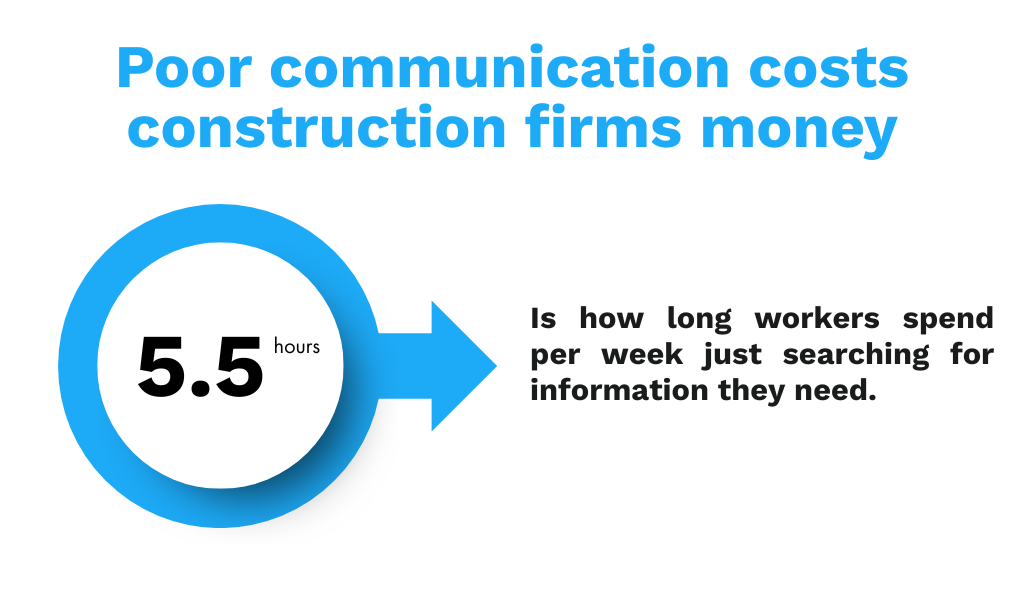
According to a PlanGrid and FMI study, poor communication and bad project data cost $31.3 billion annually in avoidable rework, and workers spend an average of 5.5 hours per week just searching for the information they need to do their jobs. That is time and money lost, not because the work itself is difficult, but because the infrastructure supporting it is not up to the task.
Lost signals
These delays are made worse by a more basic problem: coverage gaps.
At many commercial construction companies, the Wi-Fi system was set up once and has likely never been updated since. The result is a network where coverage drops in certain zones, connections cut out under load, and dead spots force workers to relocate physically just to get a signal.
When field teams cannot reliably reach project managers or when connected tools and IoT devices lose their link to the network, the coordination that keeps a project on schedule starts to break down. Research from JBKnowledge’s Construction Technology Report has consistently shown that poor or unreliable internet connectivity remains one of the top technology challenges reported by construction professionals.
What Data Connectivity Is Right for Your Team?
The right connectivity strategy depends on the specifics of the project, not on a one-size-fits-all solution.
First, think about how many users will be on the network at any given time. It goes without saying that a residential network with a small crew has very different requirements than a large commercial project with dozens of subcontractors, each bringing its own devices. Understanding capacity helps you procure the right equipment and ensure strong cybersecurity for remote workers.
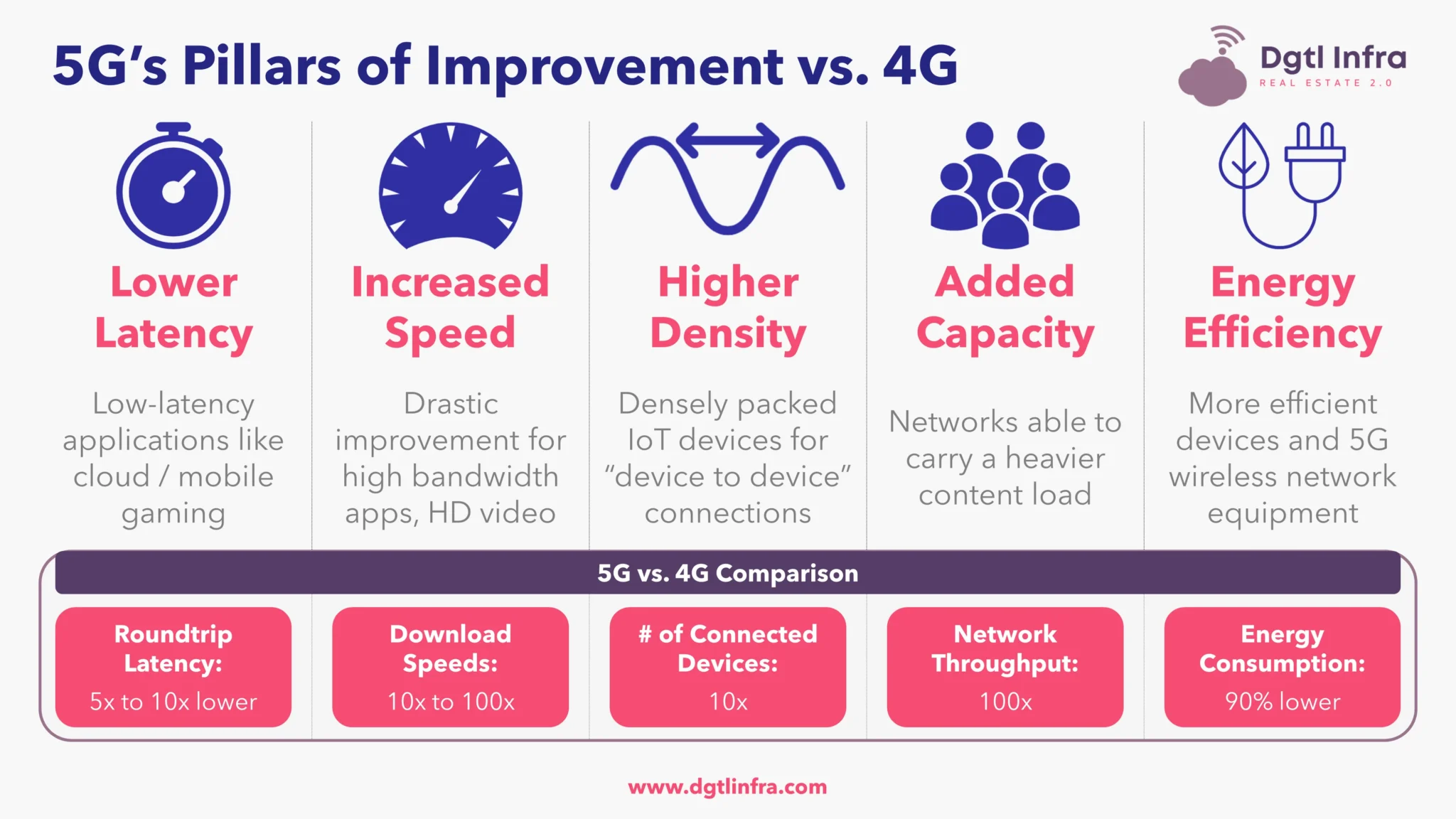
Image Courtesy of Digital Infra
Project duration also matters. For shorter-duration projects, 4G LTE may provide sufficient bandwidth at a lower cost. However, for larger or longer-term jobsites where teams are transferring heavy files and relying on cloud platforms throughout the day, 5G is likely the better investment because it can handle that sustained load without bottlenecking.
Mesh Wi-Fi vs. Single Router with Boosters
A single router with range boosters might work for a small, contained area, but for larger jobsites, that setup starts to fall apart quickly.
The difference comes down to how each approach handles signal distribution.
Boosters amplify a weakening signal, which means the further you get from the router, the worse your connection becomes. Mesh networks work differently because they use multiple access points that communicate with each other to form a single, seamless network, distributing traffic so that speeds and coverage stay consistent as users move across the site.
For larger construction companies managing complex sites, this is what eliminates the dead zones and signal drops that make single-router setups frustrating to rely on day after day.
The Importance of Commercial-Grade Equipment
Even the best network architecture will underperform if the hardware cannot survive the environment it’s placed in.
Consumer-grade networking equipment is not built to withstand dust, moisture, temperature extremes, and physical impact, and when it fails mid-project, the cost is not just the replacement hardware, but the downtime and disruption that follows.
Commercial-grade hardware rated to standards like IP65 and IP66 provides the ingress protection needed to handle dust and water exposure without degrading over time. Beyond that, cabling and infrastructure should meet TIA-568 standards for structured cabling and ANSI/BICSI 007 guidelines for ICT design in commercial buildings.
The reasoning is straightforward: if the equipment cannot hold up to conditions on site, every tool and workflow that depends on that network will be unreliable, too.
Managing Security and Compliance of Offsite Workers
Beyond performance, residential-grade Wi-Fi networks introduce serious security and compliance risks that are easy to overlook until something goes wrong.
Many jobsites are in populated areas, which means that anyone with the right equipment nearby could attempt to access an unsecured network. This is a real concern because you’re going to be transferring sensitive data like blueprints, contracts, financial records, and employee information, and a breach at the jobsite level does not stay contained there; it exposes the entire organization.
These are not theoretical risks.
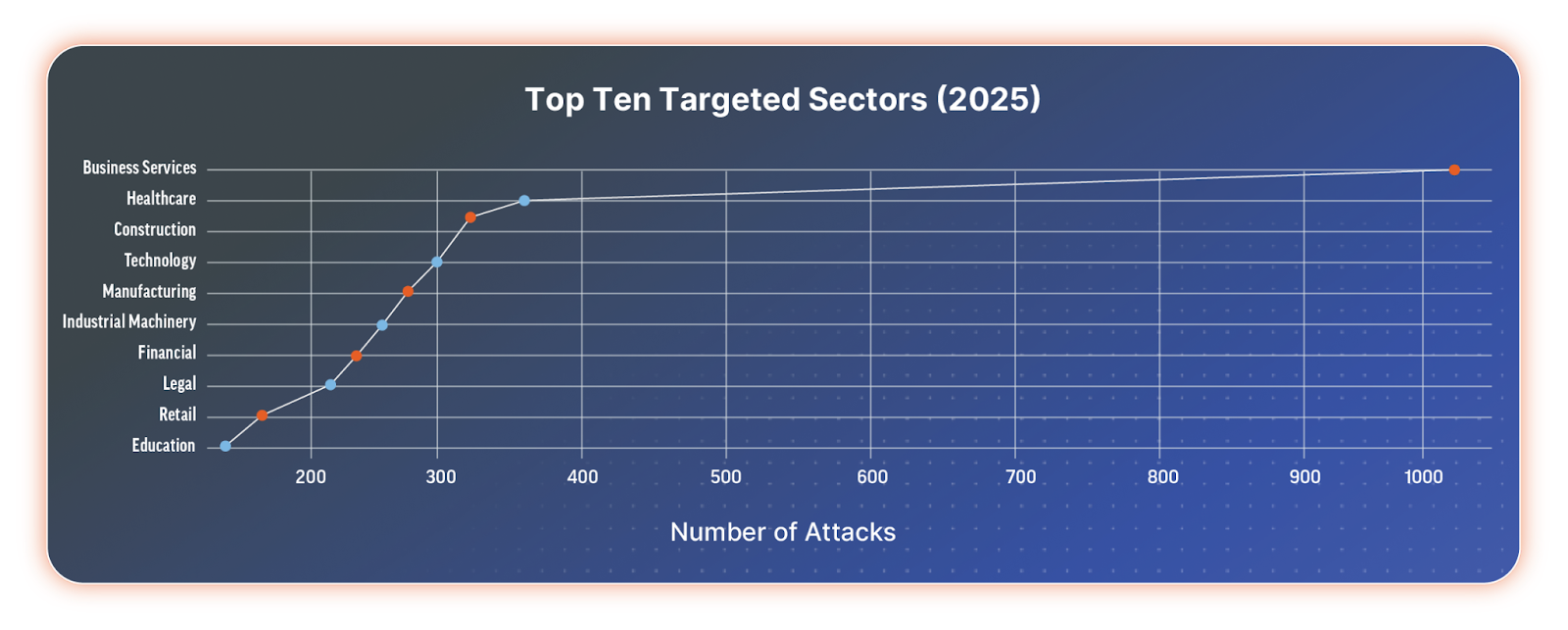
In 2025 alone, the construction industry saw 443 recorded ransomware attacks, a 24% jump from the previous year. According to Rapid7, the industry now ranks among the top three most targeted sectors, in large part because many firms still operate with outdated network security that attackers know how to exploit. According to the same research, the construction industry is now the 3rd most attacked industry vertical.
Subcontractor access makes security even more complicated.
On any given day, multiple third-party teams may need network access, each with their own devices and varying levels of security hygiene. Without proper segmentation and access controls, a single compromised device from one subcontractor can serve as an entry point into the entire jobsite network. This is why implementing role-based access and network segmentation matters so much. It allows each team to connect to the specific resources they need without giving them visibility into sensitive project data that have nothing to do with their scope.
Ongoing Network Management is Key
Even with the right strategy, architecture, and equipment in place, things will go wrong. Connections will drop, hardware will fail and usage patterns will shift as the project evolves. That is simply the reality on a construction site, where the physical environment itself is changing week to week.
What matters is how quickly problems are identified and resolved. Effective network management means having visibility into performance metrics, monitoring device health, and being able to diagnose issues remotely, rather than sending someone to physically walk the site and inspect equipment by hand.
Managed network services and remote monitoring tools can provide this kind of ongoing visibility, which means problems get caught when they are small rather than after they have already caused a delay.
For many construction companies, partnering with a managed IT provider makes this achievable without adding headcount. The goal is not to build a network that never has problems. The goal is to have systems in place that catch issues early and resolve them before disrupting the work that matters.
We’re Here to Help You Achieve Total Jobsite Connectivity
Jobsite connectivity is just as essential as power and water on a modern construction site. Without it, even the best-equipped crew will spend more time working around technology failures than benefiting from the tools they have been given.
Companies that treat connectivity as a core part of their project planning will see the returns in fewer delays, better collaboration, and stronger security. Those that continue to rely on inherited networks and residential-grade gear will keep losing time and productivity to problems that are entirely preventable.
Want to get your whole team connected and collaborating? Contact us any time at [email protected] or 614 389 4102.